Run of Show Template: How to Build One for Any Event
• John Barker
A run of show is the single most important document for any live event. It’s the master plan that tells your entire team what’s happening, when, and who’s responsible. Without one, you’re relying on memory and hope — neither of which scales well.
What is a run of show?
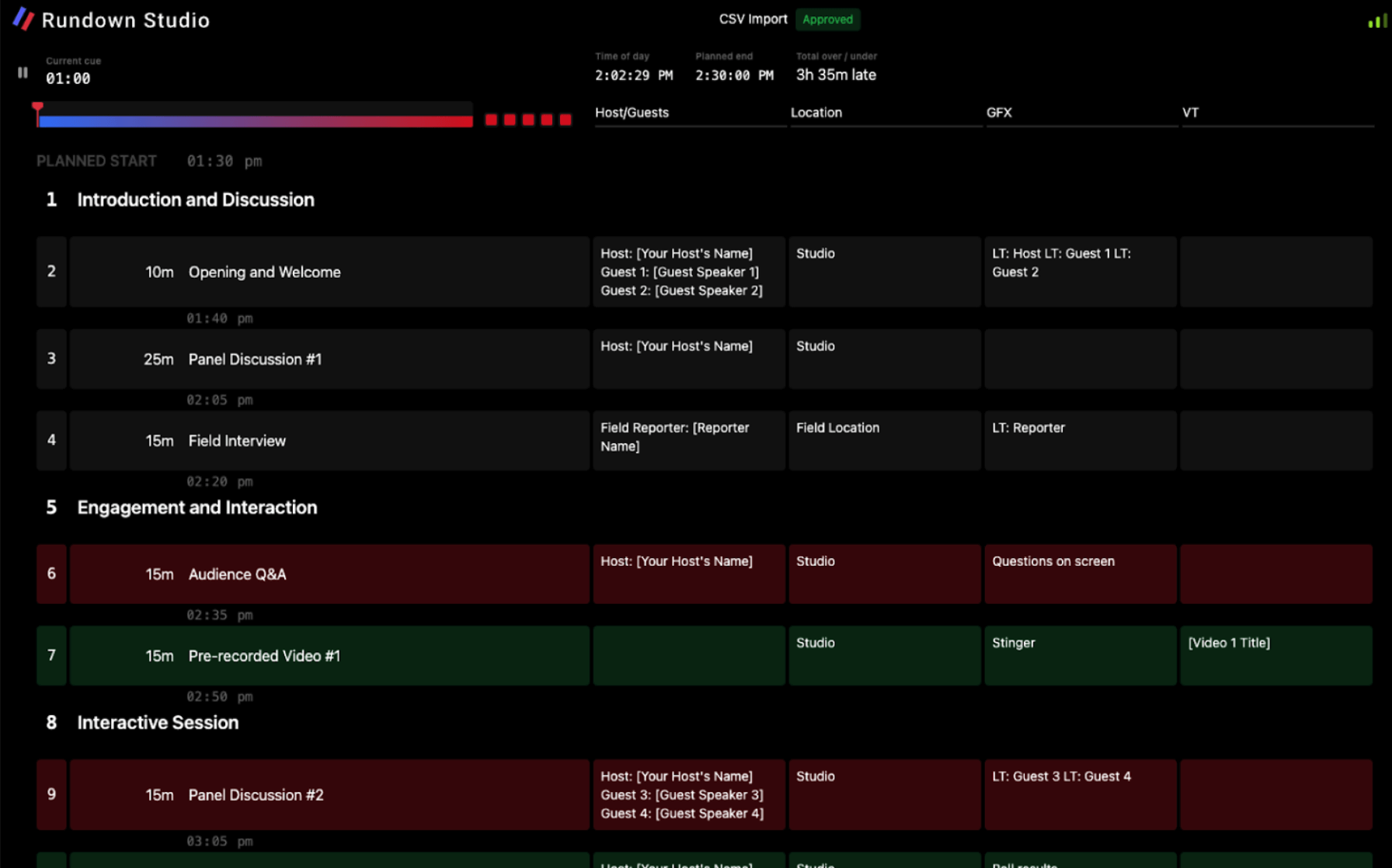
A run of show (sometimes called a “show flow” or “running order”) is a time-based document that maps out every moment of your event from start to finish. It typically includes:
- Segment name — what’s happening (“CEO Keynote,” “Award Presentation,” “Musical Performance”)
- Start time — when each segment begins
- Duration — how long it should last
- Responsible person — who’s leading each segment
- Technical notes — cues for lighting, audio, video, and graphics
- Production notes — anything the crew needs to know
It’s the document everyone works from — the show caller, the stage manager, the AV team, the client, and the talent.
What makes a good run of show?
Clear timing structure
Every segment needs a start time and a duration. This lets you calculate whether your show fits in the allotted time slot and helps the crew anticipate what’s coming next.
Decide early whether you’re using hard starts (segments that must begin at a specific time, like a live broadcast going to air) or soft starts (segments that begin when the previous one ends). Most shows use a mix of both.
The right level of detail
Too little detail and your crew won’t know what to do. Too much and nobody will read it. The sweet spot depends on your event:
- Corporate meeting — segment names, speakers, and AV notes are usually enough
- Awards show — you’ll need detailed cues for every VT, walk-on, envelope moment, and music cue
- Broadcast — frame-accurate timing and full technical cues for every department
Columns that match your team
Not everyone needs the same information. A good run of show includes columns relevant to the people reading it:
- Time & Duration — for everyone
- Segment & Description — for everyone
- Audio notes — for the sound team
- Lighting notes — for the lighting operator
- Video/Graphics notes — for the visual team
- Stage notes — for the stage manager and floor crew
- Presenter notes — for talent
Building a run of show: step by step
1. Start with the big blocks
Before worrying about individual cues, map out the major sections of your event. For a corporate conference, this might be: Registration → Opening → Keynote → Break → Panels → Lunch → Afternoon Sessions → Closing.
2. Add timing
Work backwards from your end time. If the event must finish at 5pm and you have six hours of content, you’ll quickly see if things fit — or if you need to cut.
3. Fill in the detail
Once the structure is solid, add the production details: who’s presenting, what AV is needed, where talent enters and exits, when videos play.
4. Share early, update often
Get your run of show in front of the team as early as possible. The earlier they see it, the earlier they can flag issues. Then keep it updated as plans change — a run of show is a living document right up until the show wraps.
5. Do a table read
Before rehearsal, sit down with key team members and walk through the entire run of show out loud. This catches gaps, overlaps, and assumptions that look fine on paper but fall apart in practice.
Run of show by event type
Corporate events & conferences
Keep it high-level with clear speaker assignments and AV requirements. Focus on transitions between speakers — these are where time gets lost. Include buffer time between sessions for room resets and late starts.
Awards shows & galas
These are the most complex. Every award needs its own sub-section: intro VT, presenter walk-on, envelope moment, winner walk-up, speech, walk-off music. Build in flexible timing because speeches are unpredictable.
Weddings
Structure around the key moments: ceremony, speeches, first dance, cake cutting, and entertainment. The run of show keeps vendors (DJ, photographer, caterer, venue) aligned on timing.
Broadcast & live streaming
Precision is everything. Include exact segment durations, commercial break timing, and contingency plans for over/under runs. Every second counts when you’re live to air.
Concerts & festivals
Focus on changeovers between acts. How long does each set change take? When does the next act need to be in position? Sound check timing and curfew constraints drive the entire schedule.
Common mistakes
- No buffer time — things always take longer than planned. Build in gaps.
- Too many hard starts — if every segment has a fixed time, one delay cascades through the entire show.
- Forgetting transitions — the time between segments is just as important as the segments themselves.
- Not sharing it — a run of show that lives on one person’s laptop helps nobody.
- Freezing it too early — keep updating until show day. A stale run of show is worse than no run of show.
Getting started
The best run of show is the one your team actually uses. Start simple, add detail as the event gets closer, and make sure everyone has access to the latest version.
Explore our event templates to get a head start on your next run of show.
Stay up to date with our latest guides with our email newsletter.