What's new in v2.16
• John Barker
Public API v1
This is a big one. Rundown Studio now has a complete, actively-developed public API - v1 - built from the ground up alongside the original v0 API.
Where the old API was focused on a handful of show-control commands, v1 gives you full programmatic access to almost everything you can do in the app. Build and edit entire rundowns, write cell content, manage columns, mentions and text variables, and run the show itself - all over plain HTTPS with predictable JSON.
Here’s what you can do with it:
- Full read/write access to rundowns, cues, columns, cells, mentions and text variables. Create a rundown from scratch, edit its structure, and fill in the content - all from your own scripts.
- Show control - start, pause, jump to next or previous, set the countdown, post an output message, and adjust cue durations while the show is running.
- Realtime updates - subscribe to a rundown and get every change pushed to you the moment it happens, no polling required. Perfect for driving graphics, lighting, or a Stream Deck from live rundown data. Read more.
The whole API is designed to be driven by scripts, automations and AI agents as easily as by people: snake_case everywhere, a consistent JSON shape, and errors that tell you how to fix them. Getting going is as simple as:
curl -H "Authorization: Bearer $TOKEN" \
  https://api-v1.rundownstudio.app/auth
There is a full, interactive API reference too - generated straight from the spec, so it is always in sync with the live API.
Read the API documentation to get started.
Want to see what it can do? We wrote a step-by-step guide to building your own custom, live-updating output with Lovable and the v1 API - no code required. It’s a great example of how the API is designed to be driven by AI tools as easily as by people.
Manage API tokens from your dashboard
To go with the new API, there is now a proper token management UI right in your dashboard. Mint a new token, copy it, and revoke it when you no longer need it - all in a few clicks.
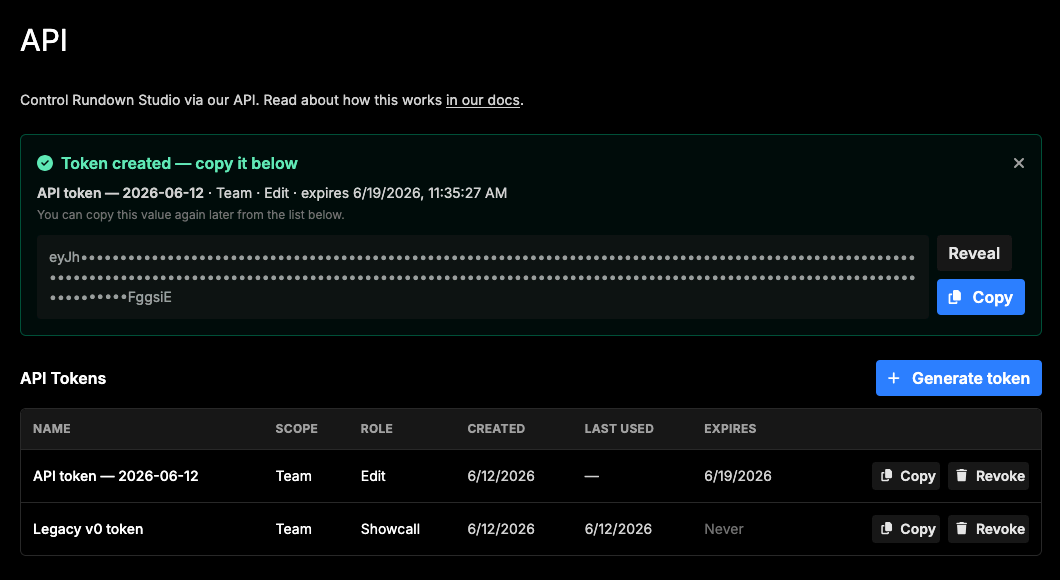
You can also set an optional expiry date on any token, so short-lived integrations and one-off scripts can clean up after themselves automatically. Every token shows its scope, role, when it was created, when it was last used, and when it expires.
Read more in the Getting started guide.
The v0 API is now deprecated
With v1 available, the original v0 API is now formally deprecated as of 1st July 2026, and is scheduled to shut down on 1st July 2028.
Nothing breaks today - v0 keeps working right through until the sunset date. But every v0 response now includes headers that point at the equivalent v1 endpoint, so you can see exactly where to migrate. If you are building something new, start with v1.
We have written a full migration guide that maps every v0 call to its v1 equivalent. Read the migration guide.
Bug fixes
- Prompter empty cues - the prompter output no longer skips cues that have empty content.
- Templates and events - creating a rundown from a template no longer inherits the original rundown’s event.
- CSV export on empty rundowns - exporting an empty rundown to CSV no longer throws an error.
- Output message label - the visibility checkbox always shows its “Show” label, and the rundown list stays readable on narrow screens.
- Mentions & variables sync - reliability improvements to how mentions and text variables sync across the app.
Thanks a bunch for using Rundown Studio. Stay up to date with development with our email newsletter.