Getting started
What is Rundown Studio?Create an accountRundown
Rundown basicsColumnsTemplatesSettingsGaps and overlapsTrashCell historyMentionsText variablesRunning a showSub-timersImport CSV rundownEvent
Event basicsSharing eventsAPI
Getting startedAPI reference ↗Build a rundown from CSVWorking with cell contentLive updates over SSESub-timers (experimental)Advanced usageError referenceMigrating from v0API v0 (deprecated)Integrations
Companion ModuleBitfocus ButtonsOBS StudioOnTheAir VideoProPresenterQLabSharing and outputs
Read-only rundownEditable rundownQuick access codeOutputPrompterPDF exportCSV exportAccount
Your teamSubscription and invoicesUpdates
ChangelogGetting started
Mint a token, make your first request, and learn how authentication works.
Everything in the API is reachable with two things: the base URL and an API token.
Base URL: https://api-v1.rundownstudio.appThis page covers what the reference doesn’t: getting a token and how authentication, retries, and rate limits work.
Get an API token
API tokens are created in the Rundown Studio dashboard. Open the API section of the dashboard and create a new token.
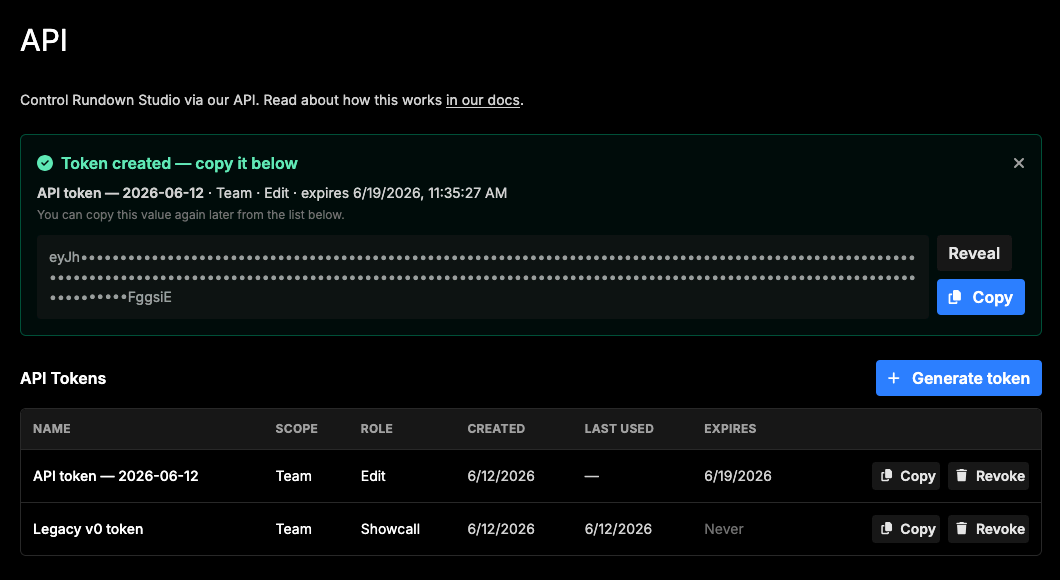
When creating a token you choose:
- Scope — a team token covers every rundown your team owns; a rundown token is pinned to a single rundown.
- Role — what the token may do. Roles build on each other:
VIEW(read) →SHOWCALL(read + run the show) →EDIT(read + run + edit) →OWNER(everything, including deleting rundowns).
Pick the narrowest scope and role that does the job — an automation that only advances cues needs SHOWCALL, not OWNER. Treat the token like a password: anyone who has it can act on your rundowns until it expires or is revoked.
Your first request
GET /auth introspects a token — it tells you what the token can do and which team and rundowns it covers. It’s the perfect first call from any new integration:
curl -H "Authorization: Bearer $TOKEN" \
  https://api-v1.rundownstudio.app/auth
{
"ok": true,
"message": "OK",
"data": {
"token_id": "tok_abc123",
"scope": "team",
"team_id": "eeqyGE2qUuicAaIW8y0o",
"rundown_ids": "*",
"role": "EDIT",
"expires_at": "2026-06-01T00:00:00.000Z"
},
"meta": {
"request_id": "req_8f4c2b6d9e1a7c3b5d8e2f01",
"server_time": 1747000000000,
"side_effects": []
}
}From there, list your rundowns:
curl -H "Authorization: Bearer $TOKEN" \
  https://api-v1.rundownstudio.app/rundowns
…and fetch one with its cues and columns sideloaded:
curl -H "Authorization: Bearer $TOKEN" \
  "https://api-v1.rundownstudio.app/rundowns/YOmm4UG2SGSomuOci44c?include=cues,columns"
Authentication
There are two ways to present a token:
1. Authorization: Bearer <token> header — works everywhere. This is the way to authenticate; use it unless you physically can’t.
2. ?token=<token> query parameter — control plane only. Production hardware that can fire a URL but can’t set a header (stream decks, cue-trigger boxes, AHK macros) may pass the token in the query string — but only on the control endpoints:
GET https://api-v1.rundownstudio.app/rundowns/:id/status?token=…
GET https://api-v1.rundownstudio.app/rundowns/:id/countdown?token=…
Everywhere else a query token is rejected with 401 auth.query_token_not_allowed — query strings end up in proxy and server logs, so the data plane insists on the header.
Rate limits
Requests are bucketed per team: 20 per minute on the free plan, 120 per minute on paid plans. Every response includes RateLimit-Limit, RateLimit-Remaining, and RateLimit-Reset headers; going over returns 429 with a Retry-After header telling you how long to back off.
Show timing: compute the countdown locally
A countdown clock does not need a request per tick. GET /rundowns/:id/status is a snapshot designed so that one poll gives you everything a local clock needs — the endpoint even sends an advisory X-Hint: compute-locally header to remind you. Don’t hammer it; poll at most about once every 5 seconds to catch state changes (cue advanced, show paused), and run the ticking clock yourself in between:
To skip polling entirely, subscribe to the live updates stream — it pushes a fresh
statussnapshot the instant state changes, and you run the same local clock in between.
state == "running":  remaining = active_cue.started_at + active_cue.duration_ms - server_time
state == "paused":   remaining = active_cue.started_at + active_cue.duration_ms - active_cue.paused_at
state == "stopped":  no active cue — nothing to count down
Anchor your clock to the snapshot’s server_time (epoch milliseconds), not the client clock — measure how much local time has elapsed since the poll and subtract that from remaining. While paused, the remaining time is frozen; on resume, started_at slides so the same formula keeps working.
If you’d rather have the server do the math, GET /rundowns/:id/countdown returns a precomputed countdown — but the same rule applies: it’s for occasional reads, not a once-per-second loop.
Where to go next
- Build a rundown from CSV — a worked example creating a fully populated rundown in one request.
- Working with cell content — how rich-text cell content works on the wire.
- Live updates over SSE — subscribe to a rundown and get every change pushed to you in real time.
- Advanced usage — safe retries with idempotency keys, calling the API from the browser.
- Error reference — every error code, what triggers it, and how to recover.
- API reference — every endpoint, parameter, and schema.