Getting started
What is Rundown Studio?Create an accountRundown
Rundown basicsColumnsTemplatesSettingsGaps and overlapsTrashCell historyMentionsText variablesRunning a showSub-timersImport CSV rundownEvent
Event basicsSharing eventsAPI
Getting startedAPI reference ↗Build a rundown from CSVWorking with cell contentLive updates over SSESub-timers (experimental)Advanced usageError referenceMigrating from v0API v0 (deprecated)Integrations
Companion ModuleBitfocus ButtonsOBS StudioOnTheAir VideoProPresenterQLabSharing and outputs
Read-only rundownEditable rundownQuick access codeOutputPrompterPDF exportCSV exportAccount
Your teamSubscription and invoicesUpdates
ChangelogCell history
See who changed a cell, when they changed it, and restore any previous version.
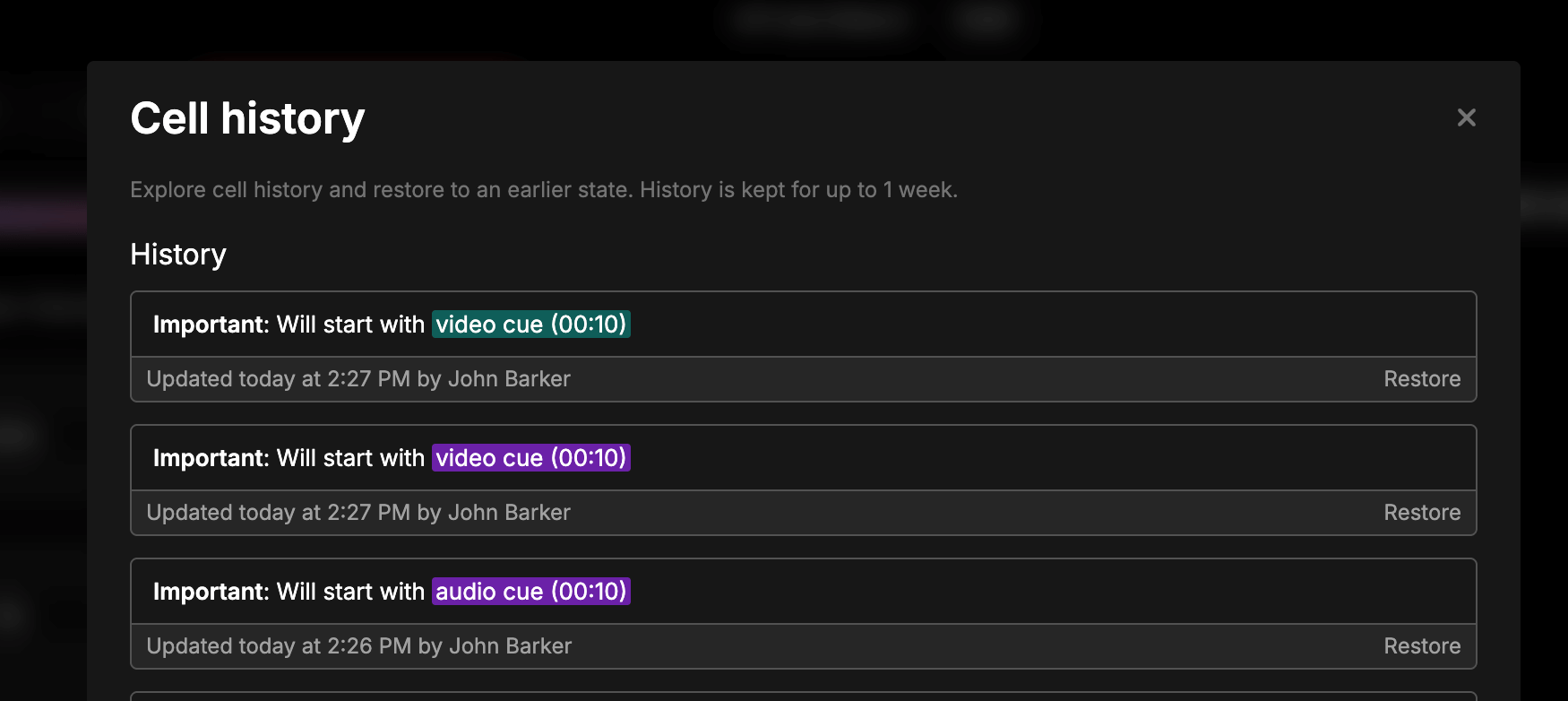
Every change to a cell is tracked automatically. If something gets edited or deleted mid-show, you can see exactly what happened and roll it back - no more guessing who changed what.
Viewing a cell’s history
Hover over any cell and click the History icon that appears. This opens the Cell history modal, listing every version of that cell with who changed it and when.
Restoring a previous version
Find the version you want in the list and click Restore. The cell reverts to that content immediately, and the restore itself is recorded as a new change - so you can always undo it again.
Retention
Cell history is kept for 30 days. Changes older than that are removed automatically.