Getting started
What is Rundown Studio?Create an accountRundown
Rundown basicsColumnsTemplatesSettingsGaps and overlapsTrashCell historyMentionsText variablesRunning a showSub-timersImport CSV rundownEvent
Event basicsSharing eventsAPI
Getting startedAPI reference ↗Build a rundown from CSVWorking with cell contentLive updates over SSESub-timers (experimental)Advanced usageError referenceMigrating from v0API v0 (deprecated)Integrations
Companion ModuleBitfocus ButtonsOBS StudioOnTheAir VideoProPresenterQLabSharing and outputs
Read-only rundownEditable rundownQuick access codeOutputPrompterPDF exportCSV exportAccount
Your teamSubscription and invoicesUpdates
ChangelogGaps and overlaps
When the cues above a hard start don't add up, the Fix menu offers concrete, one-click ways to close the difference.
Setting a hard start time on a cue pins it to a specific time of day. If the cues above it don’t add up to exactly that time, you get a gap (time to spare) or an overlap (the cues above run too long).
Rather than working out the maths yourself, the timing indicator now offers a Fix button with the options spelled out - each one showing exactly what it will do before you click it.
Finding the Fix button
Look at the timing indicator between two cues. When there’s a gap or an overlap, you’ll see the difference described - Gap of 5m or Overlaps by 5m - with a Fix button next to it.
Click Fix to open the menu.
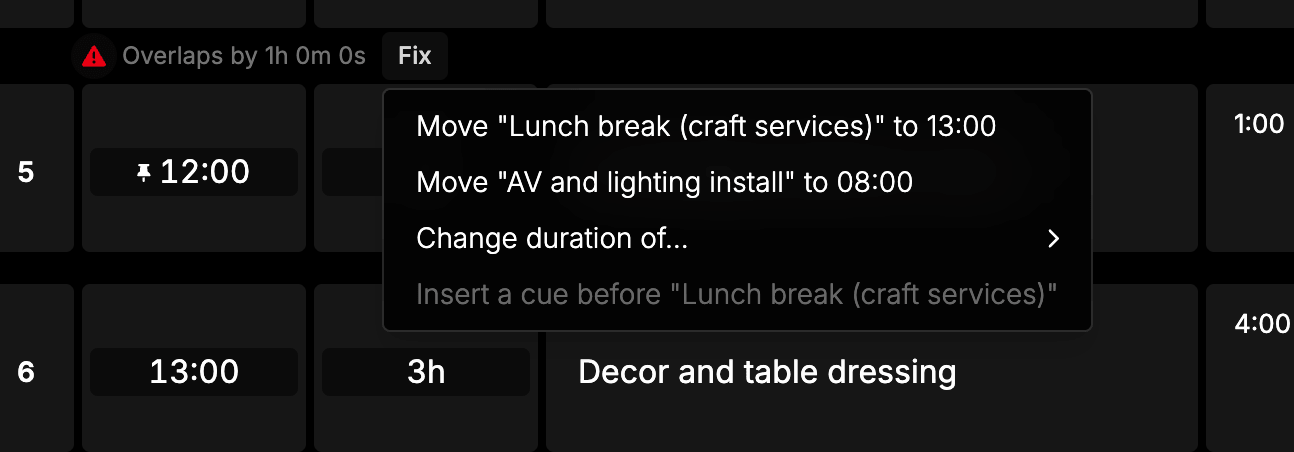
The Fix button only appears on cues with a hard start time. Soft start cues follow on from the cue above, so they can’t create a gap or overlap in the first place.
The four fixes
Every option names the cue it will change and the value it will change it to, so you can read the whole outcome before committing.
Move this cue
Move “Lunch break (craft services)” to 13:00
Moves the hard start cue itself so it sits directly after the cue above - earlier to close a gap, later to remove an overlap.
Nothing else moves and no durations change. This is usually the right choice when the hard start was only an estimate and the cues above it are the times you actually care about.
Move the earlier hard start
Move “AV and lighting install” to 08:00
Moves the previous hard start cue, sliding everything below it down so the run of cues lands exactly on this cue. This is classic backtiming: you know when an item has to happen, and you work out when you need to begin.
Durations are unchanged. If the cue being moved is the first cue in the rundown, this moves your show start time.
This option is unavailable once a show is running or has ended, because the cues above have already played. You’ll see the reason on hover:
Can’t move the show start while the show is running or ended, because the earlier cues have already played. Move this hard start or shorten a cue above instead.
Change the duration of a cue above
Change duration of…
Opens a submenu listing every cue between the previous hard start and this one, each showing the new duration it would take:
- Opening → 12m
- Interview → 8m 30s
Pick one and its duration absorbs the whole difference - lengthened to close a gap, shortened to remove an overlap. Start times stay where they are.
Individual cues in this list are unavailable when the fix can’t work.
If shortening that cue by the full overlap would take it below zero:
Overlap is longer than this cue. Pick another cue or a different fix.
If the show is running and that cue has already been on air, its length is locked:
This cue has already played, so its length is locked while the show is live. Pick a later cue.
Insert a new cue
Insert 49m cue before “Lunch break (craft services)”
Creates a new, empty cue directly above the hard start cue, with its duration set to exactly the size of the gap.
Nothing existing is moved or resized, which makes this the safest option during a live show. It’s ideal when the gap is real and needs to be filled - a break, a changeover, some padding before the next segment.
This option only applies to gaps. On an overlap it’s unavailable, because adding another cue would make the overlap worse:
Only fixes a gap. An overlap means the cues above run too long, so adding another cue would make it worse. Shorten a cue above or move a hard start instead.
Which fix should I use?
| Situation | Best option |
|---|---|
| The hard start time was a rough estimate | Move this cue |
| You know the item’s time and need to work backwards | Move the earlier hard start |
| One segment above is over- or under-running | Change the duration of a cue above |
| The gap is genuinely empty time | Insert a new cue |
During a live show
The Fix menu still works while a show is running, but any fix that would rewrite cues that have already played is withheld and greyed out with the reason. The fixes that remain - moving the hard start, changing a cue that hasn’t played yet, or inserting a new cue - are all safe to use on air.
The proposed times are recalculated each time you open the menu, so they stay accurate as the show advances.
Gaps aren’t always a problem
A gap is simply spare time and is often perfectly fine to leave alone - it tells you where you have room. An overlap is the one to watch, because it means your rundown currently runs past a time you’ve committed to.
Read more about how hard and soft start times interact in Rundown basics.